How to choose a Computer Power Supply?
- Computer Expert
- 10 lut 2021
- 10 minut(y) czytania
Table of Contents:
Which power supply to choose?
The power supply is usually selected at the very end of completing the components. And there is nothing strange in this, after all, how do you know in advance what power you need? But do you know what else is important? In this guide, we'll show you what to look for when choosing a power supply.
Expensive and cheap computer power supply
If you look at the prices of computer power supplies in stores, you will notice that they start from 40-60 dollars. So why not buy one of the cheaper power supplies, but choose the one that costs several times more? There are many answers to this question and we will come back to them later. But now think about it this way - when choosing a processor or graphics card, are you choosing the cheapest model from a few years ago?
The power supply is one of the most important components in your computer. After all, he is responsible for supplying energy to all components, so it is worth making sure that he does it in the right way. It must maintain stable voltages, not inject more current than needed. You never know when the power supply will stop working, and due to the fact that in cheap designs, security is rarely implemented - the processor, graphics card or motherboard will most likely go along with it.
Types of power supplies
Power supplies are divided into different categories due to their size. And this is how we distinguish:
• ATX power supplies - these are the most popular designs. However, you have to be careful about their… dimensions. And while their width and length are predetermined at 150 x 86 mm, the length of these PSUs (Power Supply Unit) may differ. The difference depends on the power - the higher the power, the more components the manufacturer had to put inside the device. And as their number increases, the size of the power supply increases.
• SFX power supplies - they are slightly smaller and their dimensions are 63.5 x 125 x 100 mm. Sometimes you can meet the name SFX-L. It means that their length is greater and amounts to 120 mm.
• TFX power supplies - by far the smallest structures for the least demanding computers. Their standard dimensions are 65 x 85 x 175 mm.
How to choose the power of the power supply?
The absolute most important thing when choosing a power supply is choosing the right power. It usually starts around 300W and ends at 1500W. So which one should you choose? How often it is - it depends. From what? Of course, from the components in the housing. Their number and efficiency determine how large the current consumption is. The bigger - the more powerful power supply you need. It should also be borne in mind that the power supplies achieve the highest efficiency when they operate under a load of 50% to 80%.
At this point, it is worth mentioning TDP, or Thermal Design Power. This value is expressed in watts (W) but must under no circumstances be confused with the energy consumed by the component. TDP is a parameter that determines the amount of heat released. So you should pay attention to it when choosing, for example, CPU cooler.
How much power does your computer need?
The graphics card consumes the most electricity, followed closely by the processor. Each model uses a slightly different amount of electricity. Curled components also need more energy. We will tell you what power supply you will need for the entire set:
• A powerful computer with an Intel Core i7-8700K processor, NVIDIA GeForce GTX 1080 Ti graphics card, 2x8 GB DDR4 RAM memory and All-in-One water cooling should have a 600 - 650 W power supply.
• A similar set, but with an Intel Core i5-8600K processor and NVIDIA GeForce 1070 graphics card, it needs a PSU with a power of about 550 W. The same power supply will also handle the replacement of the graphics card with the AMD Radeon RX 580. In turn, after replacing the processor with AMD Ryzen 5 2600, a 500 W power supply would suffice.
• Not enough power for two graphics cards? Okay. Choosing Intel Core i7-8700K and two NVIDIA GeForce GTX 1080 Ti cards, you have to look for a PSU with a power of about 900 W. If you decide on such a set, you will probably turn it up. In that case, you can aim even at 1000 W. It is impressive. But don't worry - it doesn't mean that your computer will use 1 kW from the socket 24 hours a day.
• What about office computers? If you install an AMD Ryzen 5 2400G processor in such a set, about 300 W is enough to power it. In fact, in any case, when you give up a graphics card, a 350-400 W power supply will be more than enough.
If you want to check what power adapter is needed to power your computer, you will find many helpful tools and calculators on the Internet. We recommend PSU Calculator from bequiet! Which, in addition to showing the recommended power, will also advise you which model is worth choosing.
Power supply unequal to power supply
Two 600W PSUs can differ significantly from each other. For example, when you see the SilentiumPC 600W Vero L2 Bronze power supply and the Chieftec 600W GPE-600S BOX power supply, you might get the impression that they are the same in terms of power - both offer 600 W. And in part they are, although there is one significant difference between them. They have different power on the 12 V, 3.3 V and 5 V lines. But what does it actually mean?
The 3.3 V and 5 V lines are responsible for powering such components as:
• sound cards
• optical drives
• hard drives
In turn, the 12 V line is responsible for powering the most demanding components, including the processor and graphics card. And it is this line that should constitute the lion's share of the power supply. Following our examples, for the Chieftec the maximum load on the 12V line is 540W, and the combined load of 3.3V and 5V is 120W. 100 W.
So, both power supplies offer power exceeding 600 W? Well, not really. These are maximum values and never occur simultaneously. The total power that the power supply can transmit to the components at any given time is 600 W.
What follows from all this? Well, when choosing a power supply, you should not only consider the total power, and it is worth looking at individual lines. Look for PSUs where the 12 V line will be as strong as possible.
There is also such a thing as peak power and rated power. You should always be interested in the latter. This is the maximum power that the power supply can operate for a long time. In contrast, peak power is only available for a short time, literally a few seconds. In the case of cheaper power supplies, it may happen that the manufacturer will mention mainly the peak one. It is worth bearing this in mind.
What else should you pay attention to?
Okay. You already know which power supply to look for. What else is worth paying attention to when choosing a power supply? What is the difference between the 30 dollars model and the 50, 70 or 120 dollar model?
Efficiency certificate
As the name suggests, it proves the efficiency of this component, and therefore determines the percentage of energy that will be transferred to the computer from the socket. As in any electronic device, some of this energy will turn into heat. And this is not needed in the power supply.
These are the so-called 80 Plus certificates, which guarantee over 80% efficiency of the power supply. This means that more than 80% of the electricity consumed from the network will be transferred to the computer components. Higher efficiency, of course, means saving money, as well as a higher work culture, because the power supply will not heat up too much.
The 80 Plus efficiency certificate is certainly a PSU feature worth paying attention to. However, the choice cannot end there. The certificate is not a guarantee of the high quality of the product. It only proves its efficiency, i.e. one of several features of a good power supply.
Voltage regulation
It is primarily responsible for maintaining the stability of voltages, the lack of which leads to incorrect operation of computer components. There are 3 types of voltage regulation:
• Group regulation - in this case all lines (3.3 V, 5 V and 12 V) are connected to one controller. We recommend that you avoid this solution, because the load on any of the lines may (and rather will) result in voltage fluctuations on the others.
• Independent regulation - as the name suggests, all lines are independent of each other.
• DC / DC converter - in this case, the most important and most loaded line is regulated first, i.e. 12 V, then 3.3 V and 5 V. This solution is considered the best, and tests show that in this case tensions are almost non-existent.
Electric security
Another, but no less important thing is electrical protection. They are an absolute must-have in any decent PSU. If you do not find information about them in the specification of the power supply, do not even consider buying it. Some models have all of them, some only a part - but each should contain at least a few of them. What are these safeguards and what are they responsible for?
• OCP (Over Current Protection) protection - is a protection against stabilizer overload. If any of the power supply lines is too loaded, the current will be too high, the OCP will turn off the PSU.
• OPP (Over Power Protection) protection - this is an overload protection. It works similar to OCP, except that it controls the entire power supply.
• OTP (Over Temperature Protection) - thermal protection. In the event of a failure of the cooling system, it protects the power supply from overheating.
• OVP (Over Voltage Protection) protection - overvoltage protection. Protects the power supply against high voltage (usually 15% more than the nominal value).
• UVP (Under Voltage Protection) protection - protection against low voltage. It works similar to OVP, with the difference that it protects the components from too low voltage, which also has a negative effect on the stability of the components.
• SCP (Short Circut Protection) protection - short circuit protection.
• SIP (Surge & Inrush Protection) - protection against surge currents.
• BOP (Brown-Out Protection) protection - protection against mains voltage drop.
PFC system
The PFC system is responsible for regulating the power factor, i.e. changing the phase shift angle between current and voltage. Put simply - the PFC system affects the efficiency of the power supply. However, for you as a computer user, it doesn't really matter. Without going into details - efficiency in this case refers to the generation of unnecessary reactive current, which is eventually returned to the power plant anyway. Of course, with some transmission losses. It can therefore be said that the PFC circuit slightly affects the "eco" level of the power supply.
The European Union requires that each power supply has such a system. There are, however, two types: active and passive. The former is a newer and more effective solution, so it is worth reaching for this version.
Wiring
The first thing is the connectors. Each power supply may have different types and numbers of connectors, so it's important to check what you need. Each power supply has a 24-pin (20 + 4) ATX connector that is used to power the motherboard and graphics card (when there are no connectors on it). In addition, each model includes an EPS cable to power the CPU. Most modern PSUs will have an 8-pin (4 + 4) connector, although sometimes a 4-pin one is also available.
What connectors besides that?
• PCIe connector - is responsible for powering the graphics card. High-performance GPU models, such as the GeForce GTX 1080 Ti, require additional power to work properly. You absolutely need to make sure how many PCIe plugs you will need. 6-pin and 8-pin (6 + 2) are mounted in the power supplies.
• SATA - mainly used to power optical discs and drives. Some components, such as the NZXT Kraken X62 water cooling system, also require a SATA cable to operate.
• MOLEX - slowly displaced, although it still finds some applications. It was used to power older hard drives, and today it is sometimes used to power fan controller.
• FDD - This is the floppy disk power cord.
The second thing is the modularity of the cabling. There are 3 types:
• no modularity - means that all cables are permanently attached to the power supply
• semi-modular (semi-modular) - means that the ATX and EPS harness cannot be disconnected, while all other cables can be disconnected
• modular - means that all cables can be disconnected from the power supply
The selection of modular power supplies is especially useful for powerful, highly complex computers. You can then disconnect all unnecessary wires, thanks to which it will be easier to arrange them, keep order and good air circulation in the housing.
Cooling
Unused energy turns into heat, so each power supply has a cooling system. Depending on the expectations and the size of the portfolio, you can choose between:
• passive cooling - the power supplies do not have fans. A great choice if you want your computer to be as quiet as possible. Such PSUs do not offer too much power, and are also expensive.
• semi-passive cooling - the fan turns only after exceeding a certain temperature. It is a great compromise between silence and power supply efficiency.
• active cooling - the fan rotates non-stop. This is by far the most popular solution.
Recommended computer power supplies

The rated power of this power supply is 650 W. Equipped with a silent Silent Wings 3 fan, fully modular cabling, DC / DC converter and 80 Plus Gold certification, it is the perfect choice for large and efficient computers.

The power supply has the 80 Plus Gold efficiency certificate. In addition, it is fully modular, and its cables are flat, which makes it easier to arrange them in the housing. In turn, the DC / DC converter ensures stable voltages on all lines.
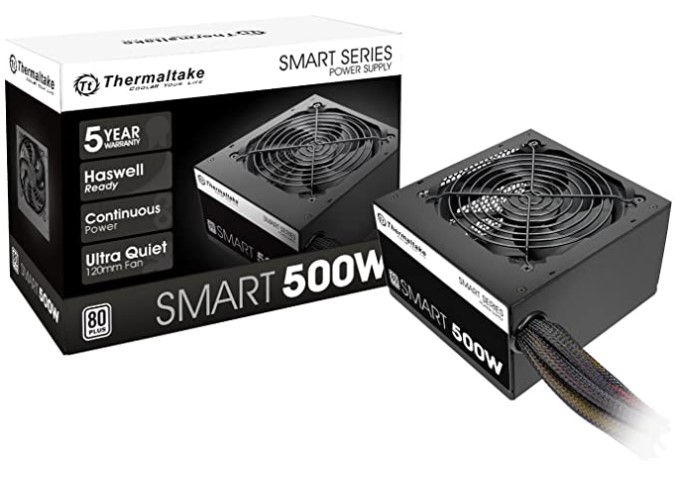
Featuring a standard ATX form factor and Intel ATX12V Version 2.3 compliance, this 500W, PSU utilizes a single +12V rail and 120mm cooling fan. Furthermore, it boasts an 80 PLUS efficiency rating and delivers 82 to 86% efficiency at 20 to 100% load.

The power supply provides stable voltage thanks to DC / DC technology. 90 Plus Bronze certification ensures efficiency reaching 89%. In addition, a number of electrical protections guarantee comprehensive protection of both the power supply and the entire computer.

Efficient power supply with a rated power of 650 W and 80 Plus Bronze certified. Perfect for the player's computer. The thermally controlled fan makes it virtually inaudible.

The Smart 430W 80 Plus Power Supply from Thermaltake is designed to deliver 430W of total power output to your PC. ... Delivering up to 86% energy efficiency under real-world load conditions, the Smart 430W Power Supply has an 80 Plus efficiency certification.


Komentarze