How to choose a Processor?
- Computer Expert
- 2 mar 2021
- 11 minut(y) czytania
Zaktualizowano: 8 cze 2021
Table of content:
The processor is one of the most important components in a computer. The performance of the desktop depends mainly on it, so its purchase should be especially well thought out. In this tutorial, we show you how to make a smart choice.
Types, markings and models of processors
Currently, the choice of processor is limited to products of two brands - Intel and AMD. Among them you will find various CPU models, symbols and designations that may seem like a random string of characters. Nothing could be more wrong. We are about to introduce you to the naming methodology.
Intel processors
Let's start with Intel processors. For many years, these units dominated the market, offering top performance in virtually all applications. What do the various names and symbols mean?
Processor series
Let's start with a series of processors. How are the Core, Pentium and other families different?
Intel Core i9 - is the latest series of processors, available from two generations (8th and 9th), with the i9-9900K model making its debut as a consumer processor. It includes units with up to 18 cores and 36 threads. They are intended for the most demanding users who, apart from gaming, also deal with film processing, video streaming or creating 3D graphics.
Intel Core i7 - this series was the most efficient consumer processors (until the release of the aforementioned i9 processor). The latest models, belonging to the 10th generation, have 8 cores and 16 threads. They can also serve as the heart of a semi-professional computer - for amateur video processing or graphics rendering.
Intel Core i5 - these processors are especially liked by players because they offer one of the best price-performance ratios. The 10th generation ones have 6 cores and 12 threads.
Intel Core i3 - these are processors designed for less demanding users. Occasional Sunday gaming and multimedia - these are the tasks in which these units will prove themselves. The newest ones have 4 cores and 8 threads. However, the earlier ones had 2 physical and 4 logical cores.
Intel Pentium - until recently they were Intel Pentium G, D. N or J processors, and even earlier just Intel Pentium. In 2017, they were divided into:
• Intel Pentium Gold,
• Intel Pentium Silver.
Pentium processors were usually overlooked if you thought about even the least demanding games. However, this changed with the premiere of the Intel Pentium G4560, which introduced HT technology to this series (more about it than), and itself has become a very popular processor for the cheapest gaming desktops.
Intel Celeron - these are simple, low-performance processors that can be used to build office computers. The last of this line is based on the Comet Lake architecture. Their clocking reaches - depending on the variant -3.4 or 3.5 GHz.
Intel Core m - these are mobile processors with a very low energy demand. However, it is related to low clocks. Currently, the latest model is still m3-8100Y, which has 2 cores and 4 threads, and the base processor clock is only 1.10 GHz. This has its pluses, of course: the CPU's TDP is only 5W.
Intel Atom - these are the least efficient processors, designed for simple computers
Among the available series of processors, they were not higher:
• Intel Xeon and Xeon Phi,
• Intel Itanium,
• Intel Quark SoC.
However, these are specific systems, intended for a specific audience, which are not home users or gamers, but rather server rooms and professional workstations and wearable devices.
Model numbers
At first glance, when you see the name Intel Core i7-8650U, you will think that someone hit the keyboard with his fist and this is how the name was born. You already know what Intel Core i7 stands for. So let's move on to the numbers, so 8650 - what's behind it?
According to the manufacturer's specifications, the first digit represents the generation - in this case the eighth. The rest is called SKU, i.e. simply an identifier for managing a given item. That's it, that's the secret.
Processor markings
Let's go further with our example - Intel Core i7-8650U. What does the U at the end mean? What do the other letters mean?
• K - means the CPU multiplier is unlocked, so the CPU can be overclocked.
• X - it's actually a separate family of processors. These are processors for HEDT (High-End Desktop) platforms.
• T - means lower power consumption and lower efficiency.
• U - Ultra Low Voltage Processor.
• Y - low voltage processor.
• H - means, according to what the manufacturer claims, very efficient graphics (integrated circuit).
• G - On mobile devices, means that it contains an external graphics card.
• F - indicates CPU with no integrated graphics chip.
In addition, you can meet the combination of two markings:
• HK - it's a very efficient graphics and an unlocked multiplier.
• HQ - means high-performance graphics and quad-core processor (in mobile units).
AMD processors
With the launch of Ryzen processors, AMD chipsets have grown in popularity. What do the various names and symbols mean?
Processor series
AMD Ryzen Threadripper - by far the most powerful AMD processors, which are characterized by a huge number of cores and threads. It is a CPU intended primarily for users who work with a lot of very complex and resource-intensive programs. The most powerful threadripper currently is the AMD Ryzen Threadripper 3990X with 64 cores and 128 threads
AMD Ryzen 9 - the second most powerful Red processors after Threadrippers, intended for professional programmers or graphic designers or for very dynamic gaming. This series currently includes Ryzen 9 3900X (with 12 cores and 24 threads) and Ryzen 9 3950X (with 16 cores and 32 threads).
AMD Ryzen 7 - Until the appearance of Ryzen 9, they were the most efficient AMD processors. The last CPU in this series is the Ryzen 7 3800X, with 8 cores and 16 threads. Like Ryzen 9, they are great for applications such as video processing and graphics rendering, but they will also be a great choice for games or streaming.
AMD Ryzen 5 - they are much more hosted in computers by players and semi-professionals. The most efficient model, the Ryzen 5 3600X, has 6 cores and 12 threads, and clock speeds up to 4.4 GHz.
AMD Ryzen 3 - these are simple and inexpensive designs, intended for multimedia computers that are played rather sporadically. Currently the most efficient model
is the Ryzen 3300X, which has 4 cores, 8 threads and a maximum clock speed of 4.3 GHz.
AMD Athlon - are the perfect choice for a cheap set for work or playing not too demanding games. The most efficient of this series are the Athlon 3000G and Athlon 240GE - both processors have 2 cores, 4 threads, 3.5 GHZ base clock, as well as integrated Radeon Vega 3 graphics. As with Intel processors, there are a few series among AMD's that we have left out. They are intended for specific audiences, servers and professional workstations (AMD Epyc) or are no longer supported (AMD FX).
Model numbers
The numeric designations are quite similar to those used by Intel. Take the AMD Ryzen 7 2700X processor, for example. AMD Ryzen 7 means family - as it was before.
The first digit, in this case 2, represents the generation of the processor. The rest, well - the rule is simple, the higher the number, the higher the yield.
Processor markings
Of course, there are letters at the end of the name. In our example, the AMD Ryzen 7 2700X is X. What do these and other symbols mean?
• X - means increased performance (clocking) in relation to the model without this symbol.
• U - is used to designate mobile processors.
• G - means that the processor has an integrated graphics chip.
• PRO - appears with business processors.
• GE - indicates a power saving processor with integrated graphics.
Processor components
The naming is behind us, so let's move on to the next thing. What to look for first when you look at the CPU specs?
Cores and threads
It is on these two things that the performance of the system largely depends. Let's start with the cores. Currently, the most popular processors have from 4 to even 8 cores. Theoretically, the more the better, although it is not that simple as a lot depends on their performance, which is mainly based on architecture. But that is a topic for a separate text. Besides, not everyone will need 8 or more cores - but more on that later.
Threads, also called logical cores, are slightly less important. By default, the number of threads equals the number of cores. However, there are two technologies that double the number of logical cores. In the case of Intel processors, we are talking about Hyper Threading (HT). In the case of AMD, this is Simultaneous Multithreading (SMT). The additional threads thus created are, however, less efficient than the physical cores. As a result, a 4-core and 8-thread processor may be less efficient than a 6-core and 6-thread chip.
Processor speed
When browsing the specification, pay attention to what clocks are given - base or turbo mode. The base clock of the core in the latest processors is approximately 3.0 - 4.0 GHz, and in turbo mode it is usually 4.20 GHz to even about 5.0 GHz. Remember, however, that turbo clocking is usually only held for a short time, often only on one of the cores.
Try to choose models with the highest base clock possible, but remember that some processors can be overclocked.
Cache memory
What is cache memory? In the simplest terms, it is a mini-disk in which the processor stores data that is supposed to be needed in the near future.
There are basically three memory levels - L1, L2 and L3, with the latter being the farthest memory, the access time being the longest and the most capacious. There is also a rare fourth level - L4. Currently, processors have from 2 MB to even 72 MB of cache memory, and in the case of Threadrippers, these values are counted in the hundreds.
It is also worth mentioning the Smart Cache technology found in Intel processors. The memory is summed up here, and each core gets as much as it needs at the moment. This solution is also used by AMD. However, in the 3000 series processors it introduced the so-called Game Cache, for smoother PC gameplay.
What else should you pay attention to?
Those were the three most important parameters - now it's time for the rest.
TDP
Thermal Design Power is theoretically a parameter that indicates the amount of heat that a processor gives off, expressed in watts (W). In theory, as both Intel and AMD have different testing methodologies, the values in the TDP column mean two different things.
AMD thus determines the maximum power that the processor can draw and give off as heat. Intel, on the other hand, defines the TDP as the maximum power absorbed and transferred in the form of heat when the processor is loaded with applications.
In fact, however, guided by this parameter when choosing cooling, it is worth choosing a model with a stock.
Integrated graphics
If you're building a low-cost or multimedia desktop, consider an integrated graphics chip. Almost all Intel processors have an integrated Intel UHD Graphics chip, while for Ryzen processors, look for units marked with G.
Technological process
Otherwise known as lithography. It largely determines the energy demand and how much heat the processor will generate. Current Intel processors are manufactured using a 14-nanometer process. AMD systems are also produced in lower lithography, i.e. 12 and 7 nm. It should be added that both companies use slightly different determinants and 12nm in one of them is not equal to that in the other.
The higher the process, the more power the CPU will draw and the more heat it will generate.
Socket
Processor socket on the motherboard where the processor resides. It is through them that the CPU connects to the rest of the desktop. To work properly, the CPU and the socket (and basically the motherboard itself) must be compatible with each other. That is why it is so important to check this parameter when setting up a computer or updating it.
Which gaming processor?
Intel processors remain the best choice for gaming. Nobody is saying that they are more profitable - they are just more efficient. This is a fact that cannot be argued. This is confirmed by numerous tests. You could end there and say - get the most efficient and expensive Intel processor. But we, according to our slogan, want to make an intelligent choice. Therefore, we will not indicate a specific model (recommended processors are listed below), but the parameters that such a processor should have.
Currently, the most profitable solution for gaming will be a 6-core processor, although you can also opt for a CPU with 4 cores. The base clock speed should not be lower than 3.0 GHz, and it should be around 3.50 - 4.0 GHz. However, when it comes to cache memory, it should be at least 6-8 MB.
Most gaming desktops are equipped with external graphics cards, however, it may be a budget design. In this case, the best solution will be AMD Ryzen processors with integrated graphics.
What processor for the office?
Much less is required of an office computer than a desktop for a player. In this case, 2-core processors, preferably 4-thread ones, will be sufficient. The core clock can oscillate around 3.00 GHz. In this case, most likely, an external graphics card will not be used, and Intel UHD Graphics systems will be sufficient for office applications. The integrated GPUs in AMD processors are of course also suitable - they are more efficient than the previously mentioned Intel graphics.
Which processor for a professional?
When processing video or working with graphics, Ryzen processors are in the lead - mainly due to the number of cores and threads. And that might actually be the answer. For these applications, choose a processor with as many cores as possible - at least 6 or 8, and HT or SMT technology. As a rule, these processors have high clock speeds, close to 4.0 GHz, and about 10 to even 72 MB of cache memory.
Recommended models of computer processors

The 10th generation processor is known as the king of gaming performance. 10 cores, 20 threads and clock speeds up to 5.3 GHz in turbo mode (base 3.7 GHz) and an unlocked multiplier will have the opportunity to show off during dynamic games.

A very efficient gaming CPU. It has 8 cores, 16 threads and 16 MB of cache memory. Thanks to Turbo Boost 3.0, you can overclock its clock to 5.1 GHz (further overclocking is also possible). You also have technologies at your disposal that will help you, for example, to stream the game even faster.

A 9th-generation processor that continues to be popular with users. The power flowing from 6 cores, 6 threads and an unlocked multiplier will prove useful in everyday work on the computer and in gaming.

The most popular CPU from the Blue catalog. Equipped with 6 cores, 6 threads, 9 MB of Smart Cache and clocking up to 4.10 GHz in turbo mode (base is 2.9 GHz). A good choice for gaming or movie streaming.

Powerful 9th Gen i3 processor with 4 cores, 4 threads and 4 MB Smart Cache. And also with an integrated Intel UHD 630 graphics chip, a base clock of 3.6 GHz and the possibility of overclocking to 4.20 GHz in turbo mode.

The most popular universal processor at present, made in 7nm lithography and Zen 2 architecture. It has 6 cores and 12 threads and 35 MB cache memory. The base clock is 3.6 GHz, and in turbo mode it reaches up to 4.2 GHz. Very good for both work and games.
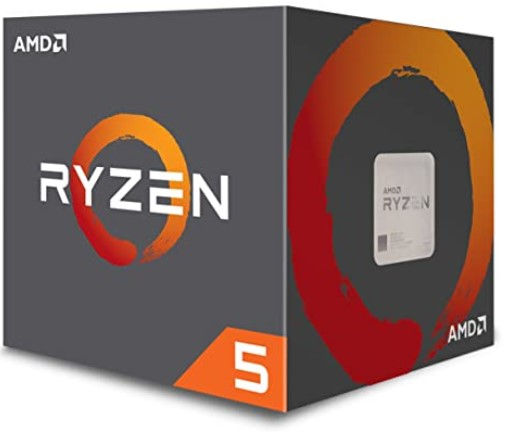
Powerful processor with 6 cores, 12 threads and 19 MB cache memory. The base clock is 3.4 GHz, while in turbo mode it reaches 3.9 GHz. Low temperature is kept by soldered diffuser and Wraith Stealth cooling.

4-core and 8-thread CPU, perfect for everyday use. An additional advantage is the presence of an integrated graphics chip Radeon RX Vega 11 with cores clocked at 1400 MHz. The processor itself reaches even 4.2 GHz (in turbo mode - the basis is 3.7 GHz).

8 cores, 16 threads and 36 MB cache will be perfect for demanding applications. The basic clock speed is 3.6 GHz, and in turbo mode you can reach up to 4.40 GHz. Unlocked multiplier allows further overclocking.

Here we can also achieve clock speeds up to 4.5 GHz, and also perform overclocking. The base clock is 3.7 GHz. The processor has 32 cores and 64 threads. This is another CPU for very intensive work with advanced programs.

We close the list with the most powerful Threadripper currently used by graphic designers and programmers. It has 288 MB of total cache memory, 64 cores and 128 threads and an unlocked multiplier for further overclocking.


Komentarze