How to choose PC Water Cooling?
- Computer Expert
- 9 lut 2021
- 5 minut(y) czytania
Table of Contents:
How to choose a PC water cooling?
PC water cooling is the most effective way to maintain optimal temperature of computer components. That is why it is so eagerly used by players, overclockers, and also installed in professional sets. But can water cooling be installed in every desktop? How does it work and how much do such sets cost? You will find the answers in our guide
What You Need To Know About PC Water Cooling?
Water and electronics. Is this connection safe at all? Will the installation leak? Is it at risk of clogging and a decrease in efficiency? If you have such doubts about PC water cooling, rest assured.
Water cooling, i.e. liquid cooling, is completely safe for the desktop, because the system is not filled with water, but with a liquid that also does not conduct electricity. What's more, the fluid contains anti-corrosive ingredients and pesticides, thanks to which the installation is not threatened with damage from the inside or obstruction caused by impurity obstruction.
However, before you proceed to the purchase and installation of such a system, check whether the housing allows water cooling at all. Not every box is suitable for this purpose. It must be spacious enough to accommodate the radiator and allow easy routing of pipes. If they are broken, the liquid flow will be disturbed and the cooling efficiency will decrease. One of the manufacturers that provides enclosures adapted to the liquid cooling installation is Corsair with the Crystal series.
When thinking about a water-cooled configuration, consider purchasing a box of this brand.
An alternative are designs with integrated liquid cooling, offered, among others, by Deepcool (Dukase Liquid and Genome series). The coolers are already installed in them, so you only need to mount the water block on the CPU and connect the module to the power supply. In these cases, the liquid cooling systems are also illuminated, and additionally supplemented with designer elements, such as blades indicating the circulation of the liquid in the system (Dukase Liquid), or an external, cylindrical tank with two spirals (Genome).
The specificity of liquid cooling work
Water cooling, unlike air cooling, cools the component not by circulating air in the housing, but by removing heat directly from the component being cooled. Heat migration from the CPU or graphics card takes place via a water block that tightly adheres to the component being cooled. The diagram of PC water cooling operation is explained in the graphic below.

Perhaps the most important element of the PC water cooling set is the radiator (in top models it can be really massive, housing 140 mm fans), in which the heat transferred by the coolant is dissipated. Optionally, fans (one, two, sometimes even three) are also installed, increasing the cooling efficiency by forcing cool air between the radiator fins.
When choosing water cooling for your computer, pay attention to the size of the heat sink and the number of fans. The bigger the radiator and the more fans it has, the better. Such kits are simply the most efficient. According to what we wrote above, check first if the massive radiator will fit in your housing at all.
When to Invest in Water Cooling computer?
Liquid cooling should not be installed in an office desktop, because fans are enough in such sets. Water cooling is a solution for high-end computers equipped with the most powerful components. Therefore, it is used in:
gaming sets, where the increase in temperature may destabilize the game,
overclocker computers by cooling overclocked components,
workstations, conducting complex engineering, geodetic or 3D model calculations.
Cooling the computer with water is also used by mod fans, for whom the appearance is as important as the power of the desktop. However, they construct their own liquid cooling sets using components available on the market. They then enrich them with LED lighting, creating original, really inventive sets.
What components will such a system cool down?
There are modules for cooling the processor, motherboard, power sections for motherboards and RAM memory available on the market. Among them, the most popular is CPU cooling. In this case, the copper base is adjacent to the top of the processor and receives the heat generated by the unit. Before you buy a water cooler for the CPU, check only its compatibility with the stand.
A liquid-cooled processor is much better at dealing with the high stress that occurs when overclocking the clock. It will also not overheat during intense games and will retain much greater stability when working with professional applications.
Already made set or assemble yourself?
When you start your adventure with liquid cooling, choose ready-made sets. You can be sure that they are tight and that there will be no accidental leakage due to inaccurate fitting of hoses or couplings. They are also factory filled with liquid. Thus, they do not require changing the fluid level. They also have the necessary screws and thermally conductive paste.
Meanwhile, for self-assembly of a liquid cooling system, appropriate knowledge is necessary. You need to know how to choose the next cooling elements (including the length and diameter of the hoses and adjust the pump capacity), know the arrangement of individual parts (their location in the desktop cannot be accidental), and be sure that the whole thing has been carefully assembled. This is an activity for advanced users, so it is safer to choose a ready-made water cooling kit.
Recommended water cooling systems

Efficient PC water cooling kit with wide compatibility with Intel and AMD processor sockets. It has a 140 mm radiator and two 140 mm SP140L fans with PWM control. In addition, the CPU cooling module is illuminated, and its color can be changed from a dedicated application.

Ensure the stable operation of the CPU in any situation. The refreshed version of the NZXT Kraken X63 kit offers even better CPU cooling, unique visual effects and intuitive installation. Adjust cooling settings yourself and keep an overview of all key system parameters.
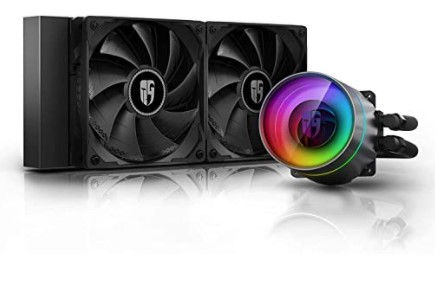
Design liquid cooling set with an aluminum 120 mm heat sink. It has two 120 mm PWM fans, mounted on Hydro-Dynamic Bearing. The spin speed range is 500-1800 rpm, and MTBF lifetime is calculated at 120,000 h. This system can be used with AMD and Intel processors, including the latest units.

Pure Loop is a water cooling unit for all those who appreciate high performance and quiet operation. Numerous functions such as double-decoupled pump and be quiet! Fans Pure Wings 2 make Pure Loop silent and reliable, and the white LED backlight and completely black design guarantee a high visual standard. Enormous cooling power ensures low temperatures even during periods of peak processor performance.


Komentarze