How to choose a motherboard to a computer ?
- Computer Expert
- 4 lut 2021
- 14 minut(y) czytania
Zaktualizowano: 5 lut 2021
Table of Contents:
Which computer motherboard to choose? What's the difference? As it turns out - not so small. Various chipsets, sockets, formats or connectors make its choice not so obvious and there are more aspects to pay attention to than you might initially think. However, this is not black magic - you will learn everything in our guide.
Types of motherboards
What a beautiful world it would be if all computer components were compatible with each other. Unfortunately, it is not so easy and when selecting the next components, you should pay attention to whether they are compatible with each other. It is no different in the case of motherboards, which differ not only in size, but also in the processor socket and chipset. Below, we decode a few important meanings, the understanding of which will make it easier to match the best disc to your set.
Motherboard formats
There are several types, and choosing the right one is important as not every motherboard will fit all cases. The main formats used in PCs are:
• Extended ATX (E-ATX) - These are the largest motherboards, their dimensions are 305 x 330 mm.
• ATX - this is the standard size, the dimensions of these boards are 305 x 244 mm.
• MicroATX (mATX) - this is a slightly reduced ATX, dimensions are 244 x 244 mm.
• MiniITX (mITX) - this is the smallest board format with dimensions of 170 x 170 mm.
However, it should be remembered that these are maximum dimensions and not rigid values.
Motherboard and processor
When choosing a motherboard, you need to remember that not every processor will suit it. This is because of the processor socket (also known as the socket). Socket is a place on a MOBO (motherboard) where the processor is installed. The list below shows the most popular sockets and the processors that you will put in them:
• LGA 1200 - 10th generation Intel processors (Core i3, i5, i7, i9)
• LGA 1151 - Intel 6th, 7th generation processors on 1 and 2 chipsets as well as 8th and 9th generation for 3 chipsets (Celeron, Pentium and Core i3, i5, i7, i9)
• LGA 2066 - Intel Core X series processors from the 7th generation
• AM4 - AMD Ryzen 1st and 2nd generation processors and AMD Athlon 7th generation processors
• TR4 - AMD Ryzen Threadripper processors
Of course, these are not all sockets - we've only presented the newest, most popular ones at the moment.
Chipsets
Apart from the processor socket, it is also very important to choose the right motherboard chipset. It affects the direct possibility of overclocking the processor, memory or combining disks into a RAID system. Particularly in the case of designs with Intel chipsets, we distinguish those on which the processors can be overclocked and those on which OC is completely impossible. For AMD brand processors, the only non-overclockable chipset is the A320.
Intel chipset
In the case of motherboards for Intel processors, there are several types of chipsets:
• X - the most advanced systems intended for professionals and the greatest enthusiasts of equipment. Designed for Intel Core X-series processors, such as Intel Core i9-7900X. Of course, it allows you to overclock them. The latest X chipsets are:
◦ Intel X299 - the latest unit for Skylake-X processors. Supports RAM in Quad Channel mode, thus ensuring their faster performance.
• Z - These are advanced consumer chipsets that are most popular with gamers and enthusiasts. They work with all "mainstream" processors such as Intel Core, Pentium and Celeron. They gained their popularity thanks to the ability to overclock processors with an unlocked multiplier, i.e. those with the letter K in the name, such as the Intel Core i5-10600K. The most popular Z-chipsets are:
◦ Intel Z490 - These are the latest boards to support the 10th Gen Intel Core and future models.
◦ Intel Z390 - this is the chip that appeared with the 9th generation Intel Core processors.
◦ Intel Z370 - is the chipset replaced by the Z390, which provided support for Intel 8th generation processors.
◦ Intel Z270 - is a chipset for Skylake and Kaby Lake processors, i.e. 6th and 7th generation Intel processors.
• H - is a universal chipset. It works well for basic PC users as well as for working in the office or in a multimedia computer. Works with all consumer processors. It is cheaper than the Z chipset, but does not allow an unlocked CPU overclock. The most popular chipsets are:
◦ Intel H470 - dedicated to Intel 10th generation processors, almost identical to its predecessor for Coffe Lake chips
◦ Intel H410 - the cheapest option for Intel 10th generation processors.
◦ Intel H370 - is designed for Intel 8th generation processors.
◦ Intel H310 - also works with CPU from Coffee Lake family. It differs from the H370 in that it is cheaper, supports fewer PCI-E lines, USB ports, SATA, and no RAID support.
B - these are business propositions, although they are often used in less demanding gaming computers or home multimedia centers. They do not support overclocking CPUs, and they usually also support fewer ports than the H or Z chipset.
◦ Intel B460 - recommended for most of the latest 10th generation 6-core processors with a locked multiplier.
◦ Intel B360 - is designed for Intel 8th generation processors.
◦ Intel B250 - is a chipset for Intel 6th and 7th generation processors.
Q - It is also a business proposition, although technically a bit more advanced than the B chipset. It usually supports more ports and connectors.
▪ Intel Q370 - for Intel 8th Generation processors
▪ Intel Q270 - for Intel 6th and 7th generation processors
C Chipsets are also available, but these target workstations, servers and Intel Xeon processors, so we'll skip them.
AMD chipset
In turn, when it comes to motherboards for AMD processors, we distinguish chipsets of the following types:
◦ X - This is the most advanced series of chipsets from AMD. Two types are available - for the AM4 and TR4 stands.
▪ AMD X570 - chipset recommended for owners of third-generation 8-core Ryzen units, which are considering the transition to newer AMD brand systems. When buying, it is worth paying attention to the revisions of the plate. Older versions do not support the first generation of Ryzen processors.
▪ AMD X399 - is a chip for 1st and 2nd generation AMD Threadripper processors. Of course, it supports overclocking, as well as RAM in Quad Channel and Multi-GPU mode.
▪ AMD X470 - this is the latest chipset for socket AM4 processors. It enables overclocking and support for AMD StoreMi technology.
▪ AMD X370 - this is a slightly older model for the AM4 socket. It also enables CPU overclocking, but does not support AMD StoreMi.
◦ B - This is a chip for users who expect high performance but don't plan on extreme overclocking or using multiple graphics cards.
▪ AMD B550 - the newest chipset for the third generation of Ryzen processors. Technically, it does not differ significantly from the B450, but it is recommended for people who care about the possibility of further expansion of the computer, without worrying about compatibility with the upcoming fourth-generation Ryzen processors.
▪ AMD B450 - is a chipset with AMD StoreMi support.
▪ AMD B350 - is slightly older and does not support AMD StoreMi technology.
◦ A - These are the basic layouts for less advanced users who don't plan on overclocking.
▪ AMD A320 - is the basic, mainstream chipset. It does not support AMD StoreMi technology and does not allow overclocking.
See motherboards with AMD A chipset
It is worth noting that not all processors compatible with the AM4 socket are fully supported by all chipsets working with this socket. A BIOS update may be required for chipsets before and after the release of certain generations of processors.
Important information is also that in the second quarter of 2020, AMD limited support for StoreMi technology. However, work is underway on a new solution, probably even more functional. If we only get more information, we will update the text with it.

Which panel parameters should you pay special attention to?
Okay - you already know that the absolute most important element you need to consider when choosing a motherboard is its socket and chipset. But what else is worth paying attention to?
Power section
When choosing AMD processors, it is worth paying special attention to the motherboard power section. Of course, there is no need to inspect the laminate for this purpose (although there are exceptions). To simplify this issue, follow the principle that motherboards with
B450 / B550 (or higher) chipsets should be selected for 4-core (8-thread) and 6-core processors.
For 8-core processors and more, it is proposed to select motherboards with X470 / 570 chipsets, which will provide the right working conditions for the processor. In this way, the power section will also not be overloaded.
It is also worth choosing a board with the most extensive cooling of the power section, regardless of the selected chipset. Such a cooling system is usually made of two heat sinks surrounding the motherboard socket.
Internal ports
The first thing is internal ports. On the laminate of each board you will find PCIe connectors, RAM memory banks and SATA ports. However, you must pay attention to how many there are and what type they are. Let's discuss the most popular and important of them.
Let's start with the RAM banks. These are usually two, four or eight. It is important to pay attention to the type of memory supported - currently the newest and most popular type are DDR4 bones.
Consumer motherboards with four RAM banks support up to 64GB of RAM. Depending on the motherboard chipset, the maximum clock speed may differ (the higher the chipset, the higher the clock speed).
For motherboards for AMD processors, it is always worth choosing the fastest bones that are supported by the motherboard. The standard here is 3200Mhz, which helps Ryzen processors (due to their architecture) achieve better performance.
Motherboards without the "Z" note for the Intel brand usually only support 2666Mhz. Therefore, the potential of faster modules will be wasted. Keep this in mind when selecting RAM for these CPUs.
PCIe ports are used to connect graphics, sound or any other expansion cards. There are several types of this connector:
◦ x16
◦ x8
◦ x4
◦ x1
they differ in data bandwidth - of course, PCIe x16 is the most efficient and reaches a bandwidth of 32 GB / s. Currently, most motherboards are equipped with the latest slot standard - 3.0. However, motherboards with PCIe generation 4.0 slots are already available on the market. It is also worth mentioning here that they are backwards compatible. So there is no concern about mounting a PCIex 3.0 graphics card in both the newer and older generation slots, although very old PCIe 1.0 boards may require a specific chipset to run PCIex 3.0 and above cards.
SATA connectors allow you to connect HDD, SSHD and SSD drives. Currently, the fastest standard is SATA III with a bandwidth of 6 Gbit / s.
M.2 connector is a new standard that is used to connect SSDs in this format. It should be noted which bus this port works with. It can be either SATA III or PCIe - of course the latter guarantees much higher performance. Additional acceleration will also be provided by the support of the NVMe protocol. There are also different sizes of these drives, but most motherboards are prepared for this.
Another thing to note is the ports on the front panel. Apart from the connectors for turning on and restarting the computer, of course, there are USB or audio ports on the panel. Therefore, it is worth checking whether the board has a sufficient number, for example USB 3.0 connectors.
fan connectors on your motherboard will be especially useful if you don't have a fan speed controller. One of them is always dedicated to CPU cooling (usually signed CPU_FAN). You can also meet a water pump connector - it will come in handy when you use water cooling.
Other connectors that you can find on the MOBO are, for example, the connector for LED strips or the U.2 port.
LED RGB / ARGB connectors. If you care about a housing with fans, RGB stripes, it is worth synchronizing everything. In order to control these lighting systems, connect them to a compatible RGB or ARGB connector. The difference in these standards is the number and layout of the connection port pins. Standard is 4 pin for RGB and 3 pin for ARGB in 1–2 system. In addition, the selection of the appropriate standard is important because no adapter can be used here. RGB fans can control a uniform backlight color, while the ARGB standard can be controlled by individual LEDs, which gives a much wider range of control, and thus many options for illumination effects.

I / O panel
So the input / output panel, which is finally located on the back of the housing. Usually, peripherals such as a mouse, keyboard, monitor or printer are connected to it. Which ports will be useful there?
Let's start with the PS / 2, which is slowly decaying. This is the port to which the mouse and keyboard are connected, but currently produced accessories already use a USB connector. However, if your accessories have round plugs, it is worth remembering that the hob has such a connector.
And since it is about USB - it cannot be missing either. In addition to the aforementioned keyboard and mouse, they are often used to connect a printer, external drive, USB flash drive or, for example, a gamepad receiver. In case you want to use this port for file transfer, it is good to use the highest standard - USB 3.2, 3.1 or 3.0. Today, there are also boards with USB Type-C inputs.
Not every disc also has an image output. This is especially important if you are using the integrated graphics chip in your processor. So pay attention to what input you will find on your monitor - it can be one of the older VGA or DVI connectors or newer - HDMI or DisplayPort. Additionally, it is worth bearing in mind that the connectors on the motherboard are not everything. The processor itself must also have an integrated graphics chip. Intel processors marked with "F" do not have such a system. On the other hand, all AMD processors without "G" in the name also do not have iGPU.
Next we have, for example, the RJ-45 connector, i.e. the Ethernet port, which is used to connect the internet cable. This connector is on every board.
Finally, there are audio connectors. They are used to connect headphones, speakers and microphones. Depending on the sound system, a different number of inputs (3 or 6) may be available.
Integrated sound card
Today, every motherboard has its own audio chip. If you are not an audiophile, but you want reasonably good sound quality - pay attention to the card implemented by the MOBO manufacturer. If the sound is not that important to you, or you simply reach for an external sound card, the integrated circuit does not play too much of a role when choosing a disc.
Currently, Realtek chips are the most popular. Several models are available, and below we have ranked them from the best quality:
◦ ALC 1220
◦ ALC 1150
◦ ALC 892
◦ ALC 887
Before choosing, it is also good to check whether the sound system has been separated, i.e. whether it has separate layers on the PCB laminate. This solution increases the cost of production, so it is mainly found in more expensive motherboard models, but it allows to reduce signal distortions and noise. Manufacturers often emphasize this by separating the audio circuit with LED backlight.
Additional modules
Motherboards can be equipped with additional modules, such as Wi-Fi or bluetooth. If you plan to use such a solution, instead of buying additional accessories, look for a model equipped with the appropriate system.
Manufacturers' technologies
Often motherboards offer something extra in addition to basic components and functions. Manufacturers use different nomenclature for, as a rule, the same functions.
◦ Reinforced structure - most often you can find boards that are made of more durable materials, PCIe connectors have additional reinforcements, slots are abrasion resistant.
◦ Overclocking Support - Some boards come with preset overclocking settings. Just select the appropriate option in UEFI and the MOBO will automatically adjust the CPU clocks and voltage. However, caution is advised when using these tools. They often boost the CPU voltage very high, causing it to overheat unnecessarily, thus increasing the noise generated by the cooling system.
◦ Sound Enhancement - This is one of the most used add-ons.
◦ Network connectivity support - these are techniques to improve connection quality and reduce interference and delay.
These are, of course, only a few of them. The list of technologies used by manufacturers is very long.
Motherboard and CPU overclocking
If you plan to overclock your processor, apart from choosing the right chipset, you should also pay attention to several other aspects, such as the power section or DualBIOS.
CPU power section
When overclocking the processor, its power section is extremely important. The better, more powerful the section, the more stable the processor will be. In this case, you need to pay attention to the number and quality of chokes and capacitors on the motherboard, as well as the MOSFET. However, the easiest way is to simply browse the internet in search of reviews and opinions about a given board or pay attention to the photos of the motherboard and verify how complex the elements are above and to the left of the processor socket.
If you plan on overclocking or buying a 6-core processor or more, opt for a board with a cooled section. It will allow you to maintain higher CPU clocks during prolonged load of the unit.
BIOS and DualBIOS
Let's start with what a BIOS is. It is the Basic Input / Output System, i.e. the basic input / output system. Controls data transfer between components. As soon as the computer starts up, it also performs a series of component tests, and informs the user of any errors with beeps, on the computer screen or on the POST code display. This is where, for example, the procedure of overclocking the processor or RAM is performed.
So what is DualBIOS? Nothing but two such systems. This is useful when the primary, default BIOS crashes. You can then easily restore it with the second system.
Recommended Motherboards

ASUS PRIME H470-PLUS is equipped with a socket 1200, thanks to which we support Intel Core 10 processors, RAM DDR4, clocked up to 2933 MHz. With DisplayPort and HDMI video outputs, you can take advantage of the graphics chip integrated in the CPU.
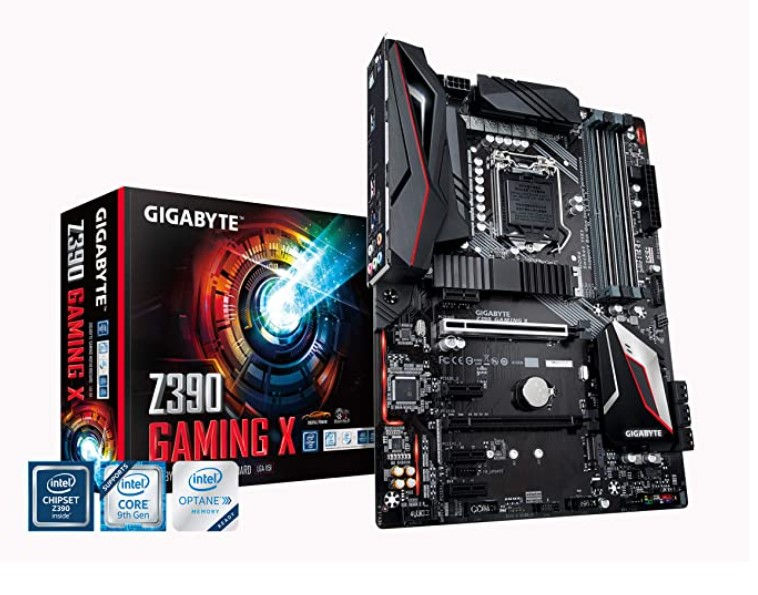
This is an ATX motherboard with Intel Z390 chipset and LGA1151 socket for Intel Coffee Lake processors. It has many external and external connectors, such as 6 SATA III ports or 2 M.2 connectors, thanks to which you have the possibility of extensive computer expansion.

With this board you will use the full potential of 8th and 9th Gen Intel Core processors. The Intel Z390 chipset will allow you to overclock chips with an unlocked multiplier and use DDR4 RAM with a clock speed of up to 4400 MHz. What's more, the board supports AMD CrossFireX technology and has M.2 connectors in which you can install extremely fast SSD drives.

This motherboard with the Intel X299 chipset is a great base for Intel Core X series processors. This model features ASUS AI Overclocking technology powered by AI for super-fast and intelligent tuning. In addition, the integrated Realtek ALC S1220A system - all this guarantees the highest level of performance.
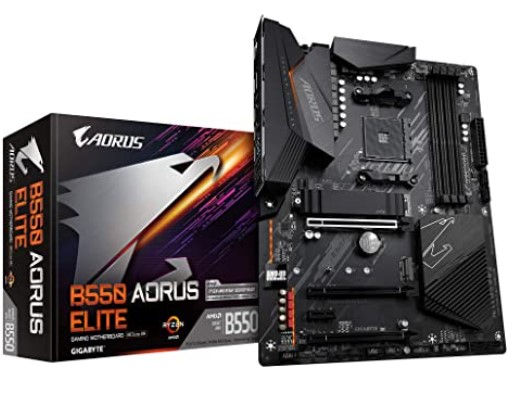
The motherboard based on the AM4 socket and the AMD B550 chipset is a design for AMD Ryzen processors. This model, in ATX format, supports DDR4 RAM clocking up to 4733 MHz (OC). In addition, it is equipped with M.2 connectors for fast SSD disks and has an integrated audio system - Realtek ALC1220.

Gaming motherboard based on the AMD X399 chipset for Ryzen Threadripper processors. Its laminate includes, among others, eight four-channel RAM modules, graphics cards in multi-GPU configurations and the Realtek ALC1220 audio chip with 7.1 sound and stereo support.

This motherboard with the E-ATX format for Ryzen Threadripper processors, equipped with the AMD TRX40 chipset, is a proposition for gamers, among others. Five PCI-E 4.0 M.2 slots will allow you to use the fastest NVMe SSD drives, which you can additionally pin in a RAID configuration or connect to a HDD, thanks to AMD StoreMI technology.

Phantom Gaming is designed for gamers! Under the amazing appearance, there is a number of gaming technologies that give excellent opportunities in the game. Everything to provide players with the best gaming experience.

This gaming board is already in the name. Equipped with the AMD B450 chipset, it is a great choice for AMD Ryzen processors. It supports high-speed DDR4 RAM memory up to 3200 MHz (O.C.). It has an integrated Realtek ALC892 audio chip, which is additionally supported by Audio Boost technology.

A solid basis for building a powerful computer equipped with an AMD Ryzen processor. This board supports DDR4 RAM up to 3200MHz and also has an M.2 connector for installing high-speed NVMe SSDs. What's more, it has a total of 7 external USB connectors, so you will never run out of a free port for your peripherals.


Komentarze